Directions EMEA 2026: 6 Microsoft announcements that change Business Central.
Three days in Paris, one message from Microsoft: soon you’ll tell Business Central what to do, and it will do it. Here’s what was announced, and when it reaches you.

In short
At Directions EMEA 2026 in Paris, Microsoft showed where Business Central is heading: you tell it what you need, and Copilot does the work, inside the permissions you already set. Six announcements matter most for small and midsize businesses. One is in your Business Central today. The rest land between now and April 2027.
- Event
- Directions EMEA 2026
- Theme
- Copilot that acts
- Next milestone
- 1 Jan 2027
- Microsoft Copilot is already in Business Central 29, at no additional cost.
- Edit with Copilot lets Copilot create, change and post records on your instruction.
- From 1 January 2027, Business Central and Microsoft 365 Copilot Business come as one discounted bundle.

Why did this Directions feel different?
Directions EMEA is the yearly conference where Microsoft and the Business Central partner community meet. As a Microsoft Partner, we spent all three days in Paris. Usually it’s a mix of roadmap, tips and tooling. This year, one idea ran through almost every keynote. Copilot stops being a helper on the side and starts doing tasks in the system itself.
That matters for a wholesaler or distributor. Most hours in an ERP go to routine edits: changing a delivery date, entering an order, fixing an address, posting a document. That is exactly where Microsoft is aiming.
Microsoft summed up its direction in three principles. Meet customers where they work. Make all functionality available to AI. Keep Business Central the trusted place where the work is executed.
What did Microsoft announce for Business Central?
Six announcements, in the order you’ll meet them: what’s in your system today, what partners are testing now and what reaches you next year.
| Announcement | What it means for you | When |
|---|---|---|
| Microsoft Copilot in Business Central | Ask questions about your own data, at no additional cost | Preview now, GA Jan 2027 |
| Edit with Copilot | Copilot creates, changes and posts records on your instruction | Public preview Apr 2027 |
| Business Skills | Your procedures in plain language, followed by Copilot and agents | Public preview Apr 2027 |
| Customize with Copilot | New fields and pages from a prompt, delivered as an extension | Partner early access Jan 2027 |
| Business Central + Copilot bundle | Business Central and Microsoft 365 Copilot Business in one discounted package | On sale 1 Jan 2027 |
| Everyday AI touches | Search by meaning, auto paste, Copilot from tooltips | With regular updates |
01Microsoft Copilot now lives inside Business Central
Since version 29, the Copilot you know from Outlook, Teams and Word sits in Business Central, replacing the old Chat with Copilot. It answers from your Business Central data, and only from what each user is allowed to see. It comes at no additional cost.
With a Microsoft 365 Copilot license it goes a step further. Answers can then also draw on your meetings, emails, chats and files, through what Microsoft calls Work IQ.
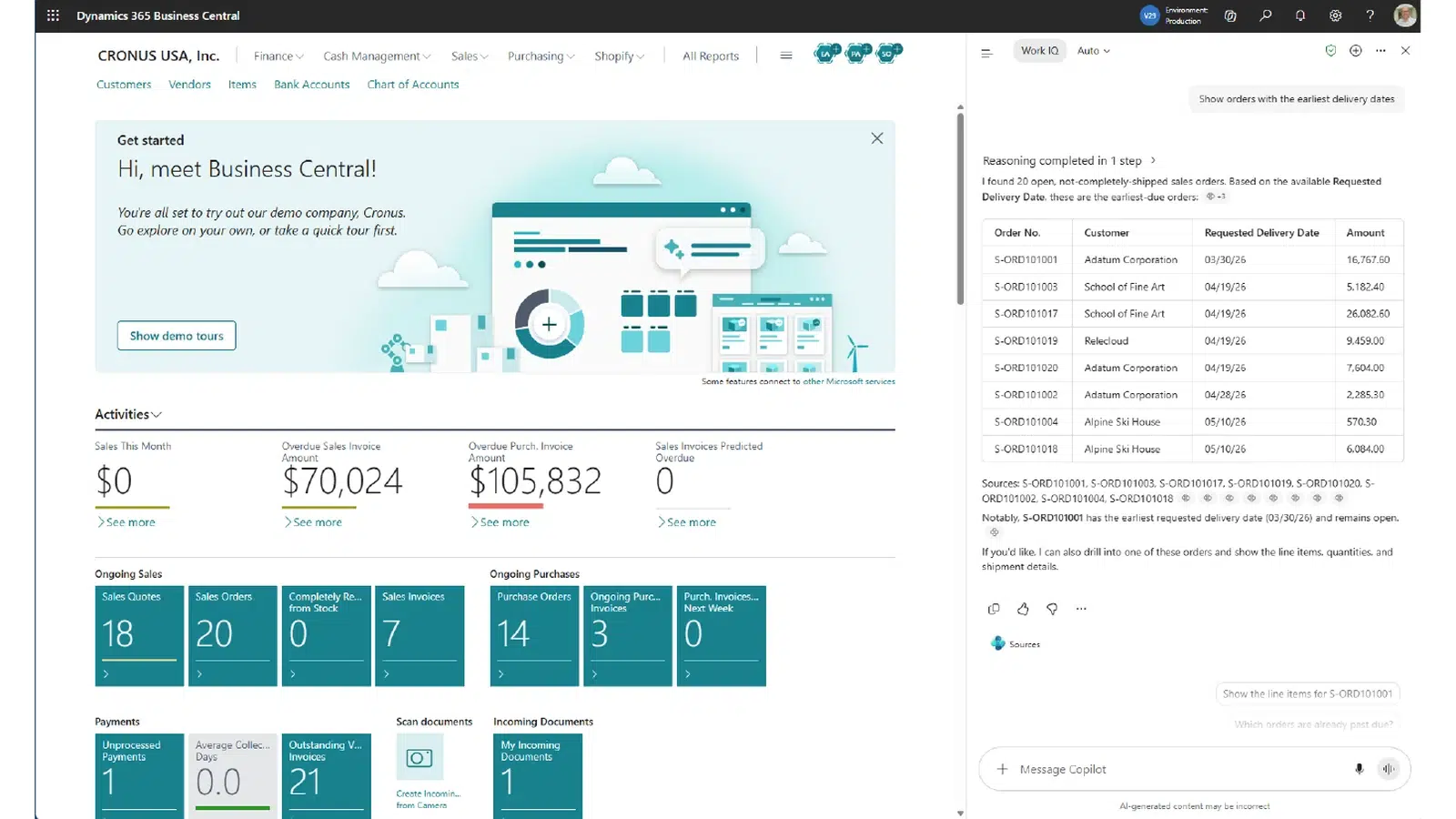
The examples in Microsoft’s Copilot session were questions a finance or purchasing manager asks every week. Which vendors have both overdue invoices and open purchase orders? Which purchase invoices would exceed cash availability if paid today?
- Our view
- The easiest first step into AI in Business Central. There’s nothing to buy and it only reads, which makes it a safe place to build trust.
- What you need to do
- It’s a preview today, and in some regions it’s off by default. Your admin switches it on under Copilot & agent capabilities. General availability (GA), when it becomes a fully supported part of the product, is planned for January 2027.
02Edit with Copilot: you type it, Business Central does it
This is the big one. Copilot chat in version 29 only reads. Edit with Copilot lets it create, change and delete records, and run actions such as applying a payment or posting an order, from one sentence you type.
Microsoft’s own examples sound like a normal week at a distributor. Update the expected delivery dates for these three orders based on the supply delay. Find a local supplier for this item and create a purchase order for 20 boxes. Post the four purchases for the new coffee tables that were received.
It also works with the extensions you already run, so your custom pages and fields are part of it.
Copilot chat today
- Reads your data and answers questions
- Points you to the right records
- You make every change yourself
Edit with Copilot
- Creates, edits and deletes records
- Runs page actions, like posting
- Handles multistep tasks across pages
- Logs every change it made
The safeguards are sensible. Copilot works as you, with your permissions and never more. It can’t edit a field you can’t edit yourself. It pauses before it deletes anything, shows a log of what it changed and marks the records it touched. Admins can see the full action log.
- Our view
- The announcement that will change daily work the most. It also makes your permission setup more important than ever.
- What you need to do
- Nothing yet. Partners can test it in sandbox environments since 27 October 2026. Microsoft plans a public preview in April 2027.
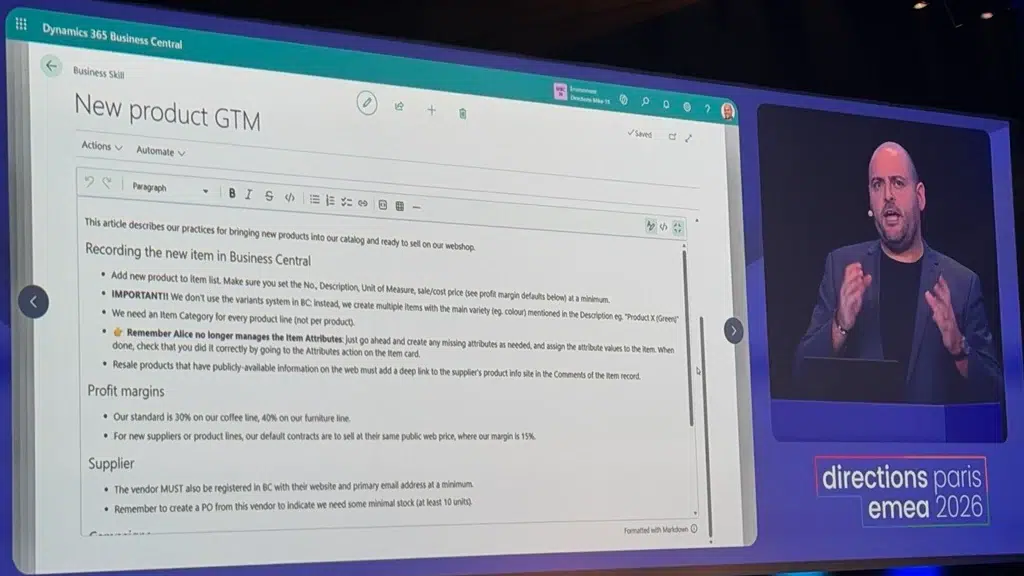
03Business Skills: your way of working, in plain language
Every company has rules that live in someone’s head or in a PDF. How to handle a first order from a new customer. When an invoice needs a second check. Business Skills let you write those rules down in plain language, so Copilot and agents follow them. On stage, Microsoft drafted skills straight from existing policy documents.
Partners get early access in November 2026. A public preview follows in April 2027.
- Our view
- Useful, as long as you know where it stops. Credit limits, blocked customers and posting checks stay in Business Central’s setup, where nobody can talk their way around them.
- What you need to do
- Start writing down how you handle your key processes. That document becomes your first skill.
04Customize with Copilot: change Business Central itself from a prompt
Edit with Copilot works on your data. Customize with Copilot works on the system. In the day 2 keynote, Microsoft asked Copilot, from inside Business Central, to add a new field to a table and to the pages that show it. Copilot built that change as a new extension and installed it.
Details are still thin. We’ll write about it once we’ve seen it at work.
- Our view
- Promising for small, frequent changes. An extension built by Copilot is still an extension, though: it needs testing, a clear owner and a place in your update plan.
- What you need to do
- Nothing yet.
05Business Central and Copilot in one discounted bundle
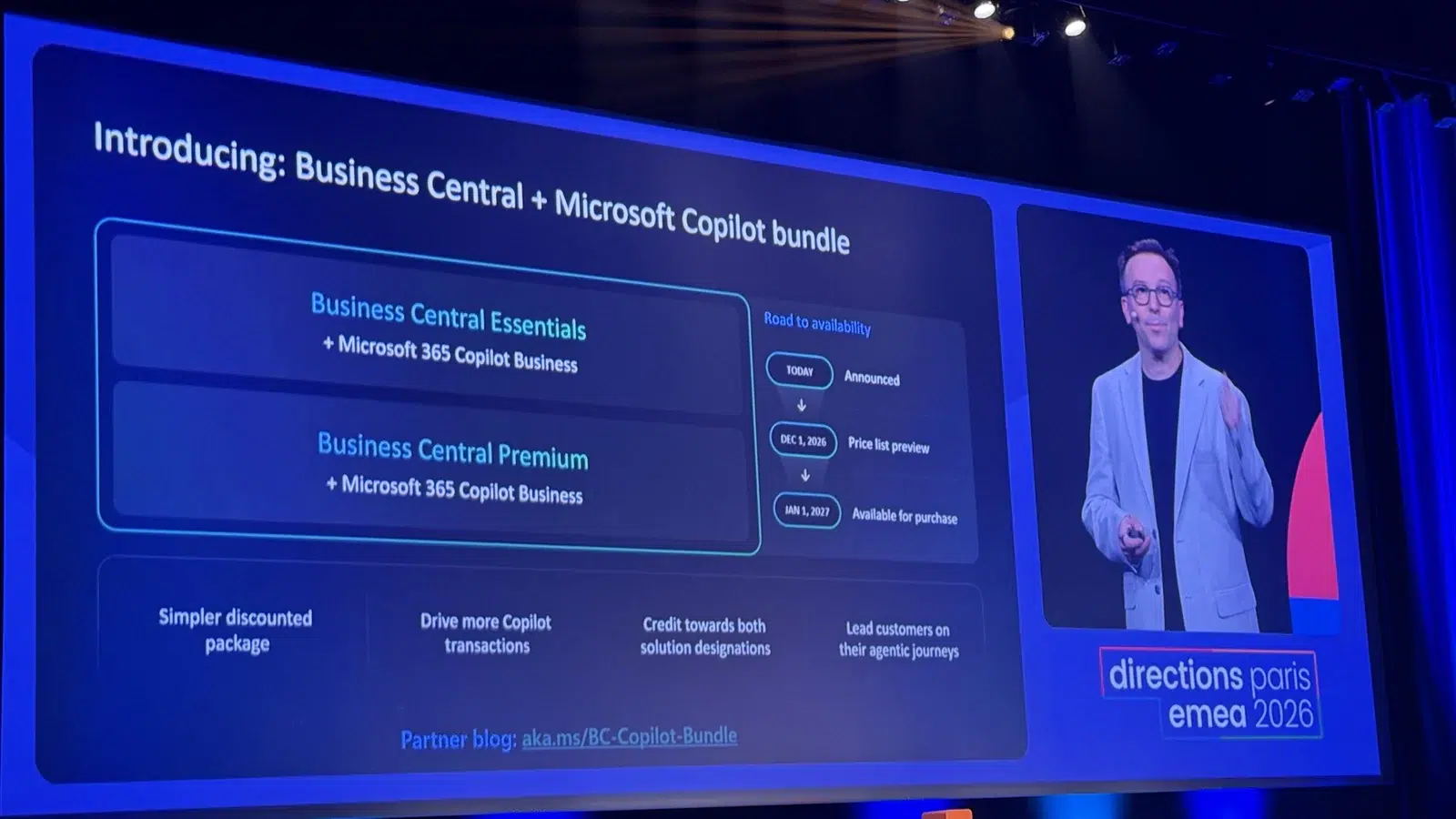
Until now, Business Central and Microsoft 365 Copilot were two separate purchases. Microsoft announced a bundle that combines them at a discounted price, in two versions:
- Business Central Essentials + Microsoft 365 Copilot Business
- Business Central Premium + Microsoft 365 Copilot Business
The price list preview follows on 1 December 2026. From 1 January 2027 you can buy it.
- Our view
- The simplest way to give your team Copilot across Outlook, Teams, Word and Business Central. One caveat: the bundle covers licenses. Metered features, such as agents, are still billed separately through Copilot Credits.
- What you need to do
- Already paying for both, or planning to? Talk to us before your next renewal. We’ll compare the bundle with what you pay today once the price list is out.
06Smaller AI touches that save clicks every day
Not everything was a keynote moment. In the session on everyday productivity, Microsoft showed AI in the screens you use all day.
- Search by meaning. Tell Me (Alt+Q) understands plain-language phrases, not just exact page names. The preview label is gone.
- Auto paste. Copy details from an email and Business Central offers to fill the matching fields, with smart lookups behind it.
- Ask Copilot from a tooltip. Get an explanation of a field right where you are.
- What you need to do
- Nothing. These arrive with your regular updates.
What lands when?
Early access means partners test a feature in sandbox environments. Public preview is when customers can try it. General availability is when it’s ready for everyone in production.
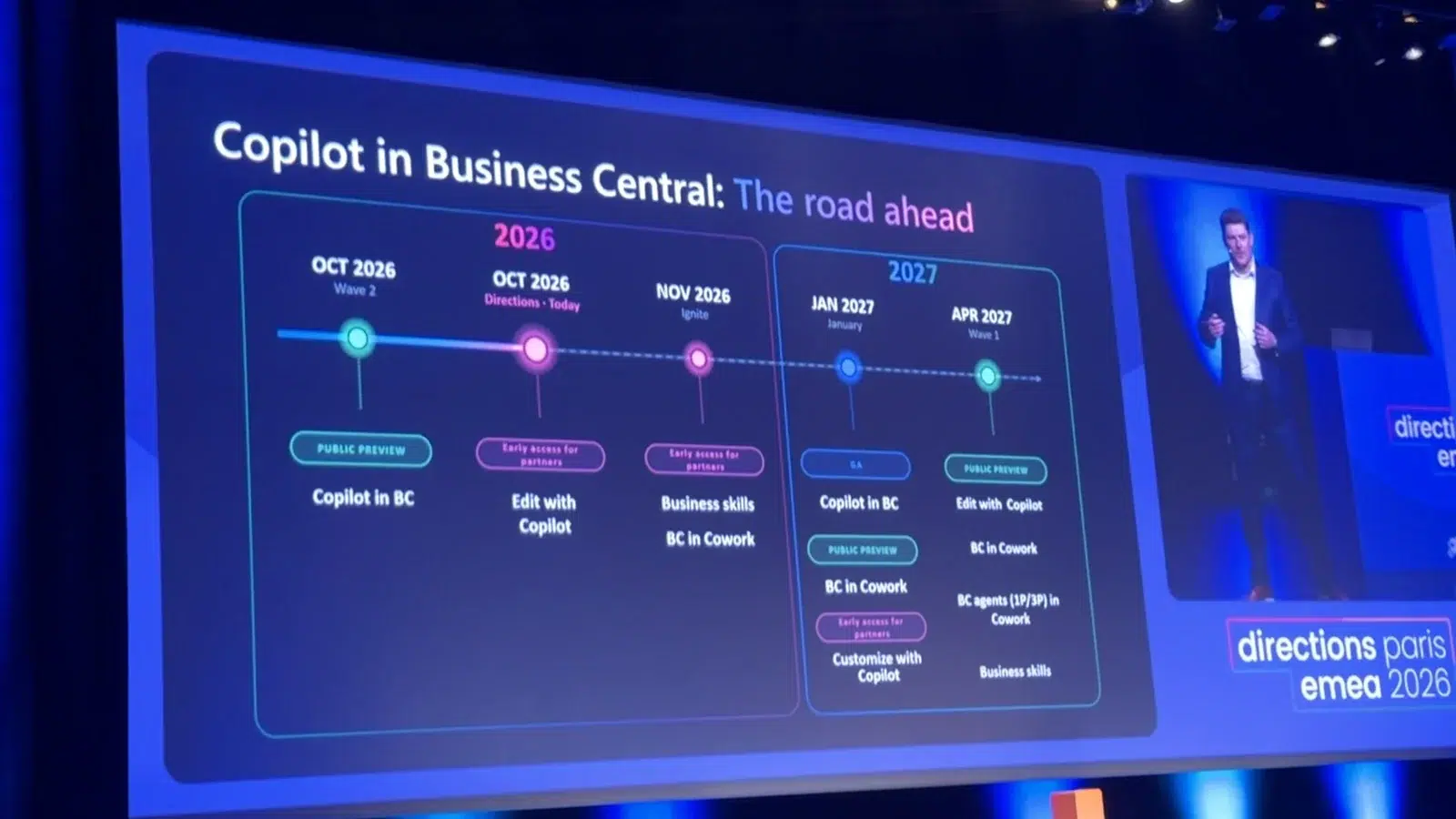
- Oct 2026Copilot chat in previewEdit with Copilot early access
- Nov 2026Business SkillsPartner early access
- 1 Dec 2026Bundle pricesPrice list preview
- Jan 2027Copilot in BC: GABundle on sale
- Apr 2027Public previewEdit with Copilot and Business Skills
What doesn’t change?
Three things to keep in mind before the excitement takes over.
- Copilot never gets more rights than the user. If someone shouldn’t post invoices, Copilot can’t post them for that person either. A clean permission setup is your first AI project.
- Preview means preview. Edit with Copilot is for evaluation only for now, in English and in sandbox environments.
- Not all AI is included. Copilot chat comes at no additional cost. Metered features, such as agents, are billed through Copilot Credits, with or without the bundle. Check the cost model before you scale.
In our view, the companies that benefit first are the ones with clean data, clear permissions and processes written down. None of that needs AI to get started. Read more about how we approach AI agents in Business Central.

What can you do now?
Switch on Copilot chat
Ask your admin to activate it and let a few key users try it on real questions from their week.
Review your permissions
Copilot acts with each user’s rights, so this is the foundation for every next step.
Write down your processes
Order handling, invoice checks, the exceptions. They become your first Business Skills.
List the repetitive edits
The changes your team makes every day are the first candidates for Edit with Copilot.
Check your licenses
Paying for Business Central and Microsoft 365 separately? Put the bundle on the agenda before your next renewal.
Sources. Keynotes and Microsoft sessions at Directions EMEA 2026, Paris, 27 to 29 October 2026. Microsoft Learn: Use Microsoft Copilot in Business Central, Edit with Copilot (preview) and What’s new in Business Central 29.0.
Published 2 November 2026. Roadmap dates and bundle details are Microsoft’s and may change.
Key takeaway
Copilot is learning to do the work. Make sure your Business Central is ready for it.
Clean permissions, processes written down and a first try with Copilot chat. We can help you start with all three.
Common questions
Everything you need to know.
What did Microsoft announce for Business Central at Directions EMEA 2026?
Six things matter most for small and midsize businesses: Microsoft Copilot inside Business Central 29 at no additional cost, Edit with Copilot (Copilot creates, changes and posts records on your instruction), Business Skills (your procedures in plain language), Customize with Copilot (new fields and pages from a prompt), a discounted Business Central and Microsoft 365 Copilot Business bundle on sale from 1 January 2027, and smaller AI features such as search by meaning and auto paste.
What is Directions EMEA?
Directions EMEA is the yearly conference where Microsoft and the Business Central partner community in Europe, the Middle East and Africa meet. The 2026 edition took place in Paris from 27 to 29 October. The 2027 edition is planned for Budapest, from 9 to 11 November.
Is Microsoft Copilot in Business Central free?
Copilot chat in Business Central comes at no additional cost and answers from the data each user is allowed to see. To also use your meetings, emails, chats and files through Work IQ, you need a Microsoft 365 Copilot license. Metered features, such as agents, are billed through Copilot Credits.
When can we use Edit with Copilot?
Partners can test Edit with Copilot in sandbox environments since 27 October 2026, in English and for the US, UK and German versions. Microsoft plans a public preview in April 2027. It is not meant for production use yet.
Can Copilot change data it shouldn’t?
No. Copilot works with the signed-in user’s permissions and never more. It can’t edit a field the user can’t edit, it asks for approval before deleting a record, it logs every change it made, and admins can review the full action log.
What is the Business Central and Microsoft Copilot bundle?
A combined offer announced at Directions EMEA 2026: Business Central Essentials or Premium together with Microsoft 365 Copilot Business, as one discounted package. The price list preview follows on 1 December 2026 and the bundle can be bought from 1 January 2027. Metered features, such as agents, are billed separately through Copilot Credits.
What does general availability mean?
General availability, or GA, is the moment a feature leaves preview and becomes a fully supported part of the product. Microsoft plans GA for Copilot in Business Central in January 2027.
Keep reading
All articles-
Business Central 29 is here. Here’s what actually changes
Microsoft shipped version 29.0 on 1 October 2026. Most of it won’t touch your day. Eleven things will.
Read the article -

Get paid faster without chasing invoices
Business Central can create, issue and email your payment reminders on a schedule, in your customer’s language. How to set it up in five steps.
Read the article
Wondering which of these fit your business first?
Fifteen minutes is enough. Tell us how you work, and we’ll tell you where Copilot can help first and what to prepare.